
Building Smarter SaaS Engineering Systems with AI
Learn how to use AI to build a more efficient SaaS engineering system, covering knowledge base architecture, AI-assisted code review, automated UI generation, and integrated testing workflows that scale with your product.
Software engineering teams building SaaS products tend to hit the same set of problems as the product scales. The codebase grows more complex. More developers join the team. Standards become harder to enforce consistently across contributors. The documentation that was once maintained informally becomes inconsistent and hard to rely on. And processes that felt lightweight at the start, such as code reviews, local environment setup, and creating new UI components, start taking longer than they should.
At this point, patching individual problems rarely works. The smarter move is to rethink the infrastructure around how the product is built. This guide covers how to approach that systematically, using AI to make the right information available at the right time, reduce friction in everyday engineering tasks, and automate the parts of the process that are well-defined and repetitive, so that developers can stay focused on the work that requires real judgment.
Build a Centralized Engineering Knowledge Base First
A centralized, well-structured knowledge base is the foundation that every other AI-driven workflow in a development system depends on. This means one place that holds all system documentation, architectural decisions, coding standards, component guidelines, and AI agent instructions. Not a shared folder, not a scattered set of wikis, a single repository with a consistent format.
Markdown is the right format for this. It is a universal documentation standard that works equally well for human readers and AI agents. Every IDE, every code review tool, and every AI framework in common use today reads and writes Markdown natively. Proprietary formats like Confluence's internal storage format create friction when connecting documentation to automated workflows. A single Markdown repository does not.
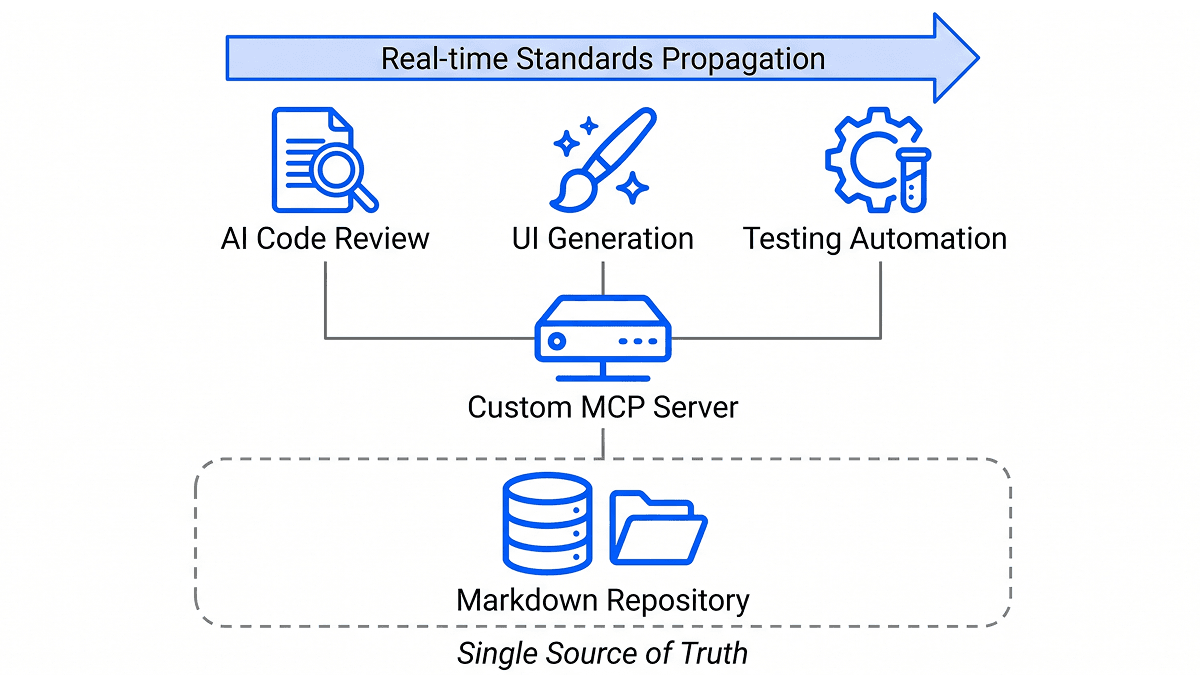
The more consequential architectural decision is making this knowledge base accessible to AI agents through a custom Model Context Protocol (MCP) server. MCP is a standard protocol that defines how AI agents communicate with external tools and data sources, in the same way that Figma's MCP allows an AI agent to read design files directly. A custom MCP server built on top of the knowledge base exposes tools for reading from and writing to the documentation, as well as any workflow-specific operations the team needs.
The practical effect is that when an AI agent executes a task, it does not rely solely on training data or on instructions hardcoded into a prompt. It retrieves the relevant guidelines, standards, or task-specific instructions from the knowledge base at runtime. When standards evolve, updating the knowledge base is all that is required, and every workflow that depends on those standards picks up the changes automatically.
Agent skills belong in the knowledge base too. A skill is a reusable, parameterized set of instructions for completing a specific task, such as generating a UI component or updating documentation for a set of code changes. Storing skills centrally means every developer on the team is working from the same version, and improvements made by one person are immediately available to everyone else.
Give the Knowledge Base a Human Interface
A raw GitHub repository of Markdown files is not a practical interface for everyday documentation work. Teams that build a knowledge base but leave it as a bare repository tend to stop using it quickly because the friction of contributing to it is too high.
The solution is to build or adopt a front end that makes the knowledge base as easy to use as a tool like Confluence, while keeping the underlying storage as plain Markdown in version control. The minimum viable version of this is a static site generator like Docusaurus rendering the Markdown as a readable documentation site. The more complete version adds a rich text editor that translates formatted input into Markdown under the hood, so contributors can write documentation without thinking about syntax, and an AI-powered search and chatbot interface that lets anyone on the team find information using natural language.
With this setup, the knowledge base serves two audiences simultaneously: the AI agents that read it programmatically through the MCP server, and the human developers who read and maintain it through the interface. Both are working from the same content.
Rethink Code Review for Multi-Repository Products
Most SaaS products that grow beyond a single repository and involve multiple interconnected microservices end up with a multi-repository structure. Features routinely touch a core backend, a web front end, a mobile codebase, and a shared component library simultaneously. Standard code review tooling is built for single-repository workflows and handles this situation poorly.
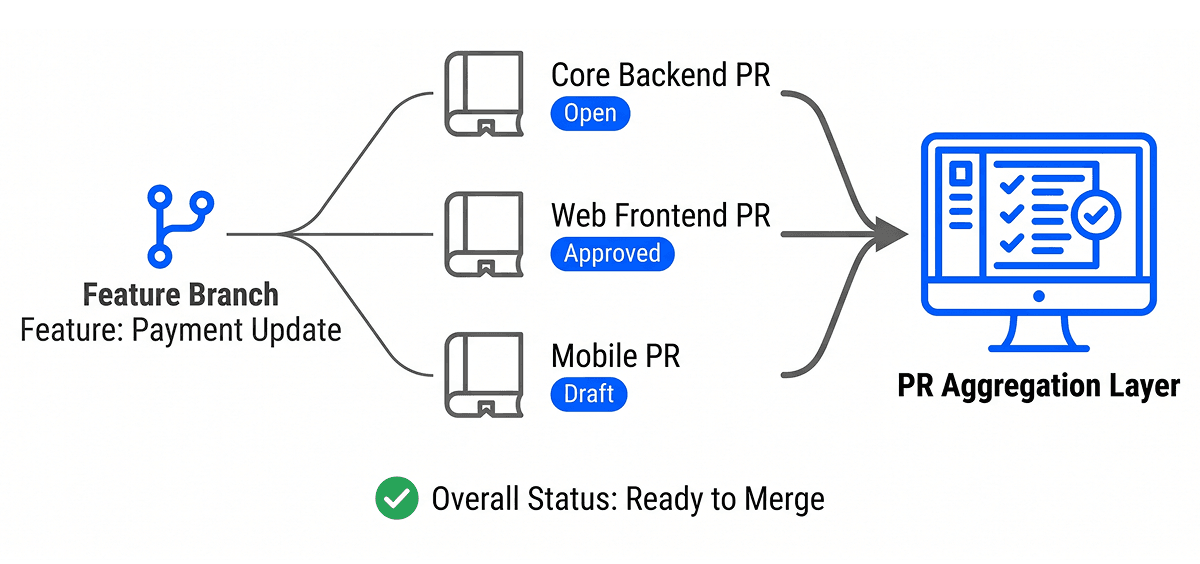
The first thing to build is a PR aggregation layer. This is an internal tool that allows a developer to link all the pull requests related to a single feature into one submission, and then tracks the real-time status of every linked PR including CI checks, review comments, and merge conflicts in one place. A team lead reviewing work should be able to see a single status that tells them when everything is ready, without having to check across several repositories manually.
For AI-assisted code review, the common off-the-shelf options have a shared limitation: they operate on a fixed context window and typically only work within a single repository. For a multi-repository product, this means the AI reviewer lacks the full picture of how a change fits into the broader system, which leads to shallow suggestions on large pull requests.
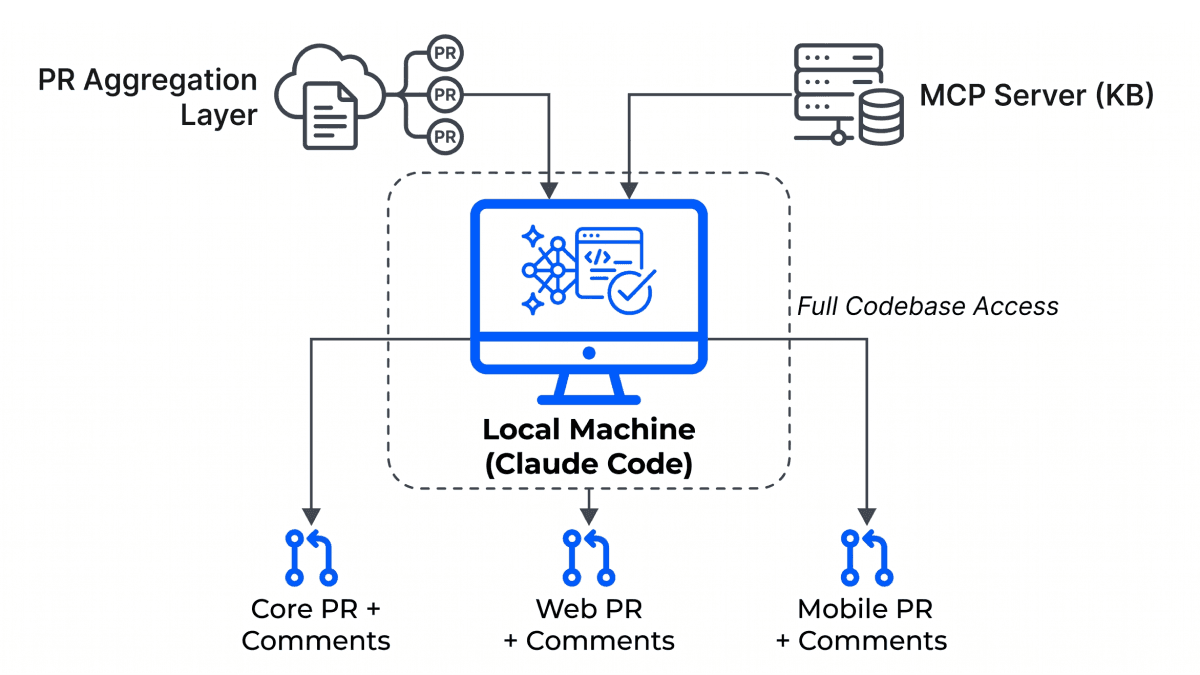
The more effective approach is to run the AI review process on a local machine where the full codebase across all repositories is accessible simultaneously. A desktop application connected to the PR aggregation layer can pull all active submissions, check each one against its task description and original design files, and post detailed review comments back to the relevant pull requests. Connecting this application to the same knowledge base through the MCP server means it applies architectural guidelines and coding standards automatically, without those standards needing to be hardcoded into the tool. Running it locally through an existing Claude Code license avoids additional API costs entirely.
Automate UI Component Generation End to End
Building UI components for a product with a shared component library involves a predictable sequence of steps: read the design file, translate it into code, align it with the library's conventions, write documentation and stories, register the export, and open a pull request. Each step is manual, and varying approaches among developers lead to inconsistencies in the library over time.
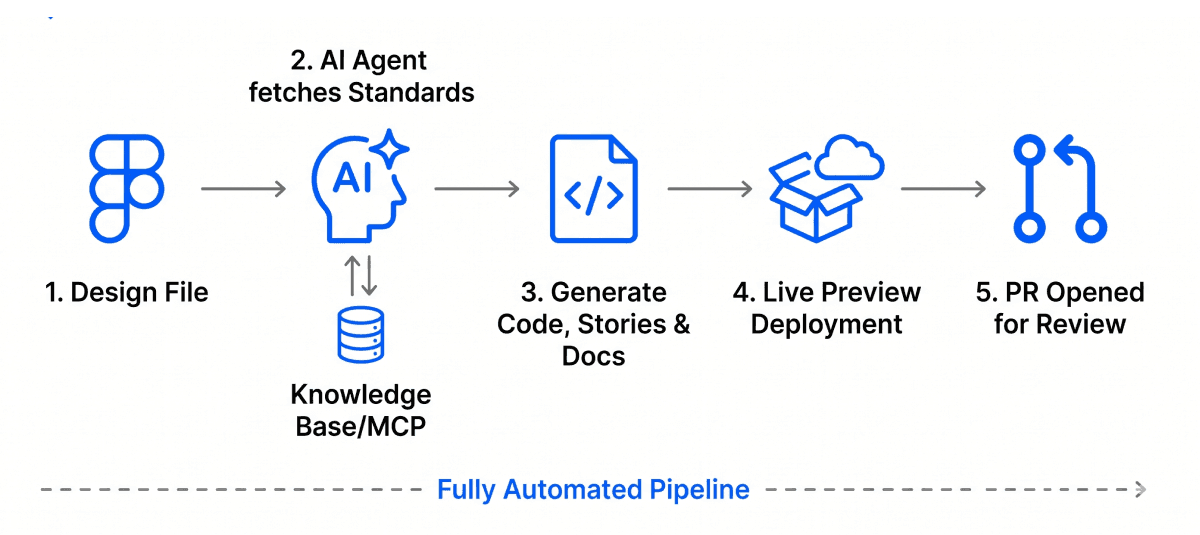
An AI-driven workflow can automate this from a Figma link to an open pull request. The agent connects to the knowledge base through the MCP server and retrieves the specific instructions for how components are structured in the system, including prop definitions, styling conventions, accessibility requirements, and the classification rules for the design system being used. It classifies the new component, checks whether existing components can be reused within it, generates the code, writes stories and documentation, registers the export, and opens a pull request.
Once the PR is open, triggering a temporary deployment automatically gives reviewers a live preview of the component without needing to import it into a project. The review can focus on behavior and quality rather than trying to visualize the component from code.
The reason this works consistently rather than producing generic output is the knowledge base connection. The agent reads the exact standards defined for the system and produces output that matches those standards from the first pass, rather than requiring multiple correction cycles.
Make Automated Testing Part of the Build Process
Testing that happens as a separate phase after development is complete always creates the same bottleneck: test coverage perpetually chasing new features, with the pressure to ship meaning tests are written quickly or deferred. Integrating test generation into the development workflow itself avoids this.
When a code change is made, an AI workflow should identify what changed, determine what category of tests is appropriate, generate unit tests for utility functions and logic, and generate end-to-end tests for new UI features. These tests should run locally before the PR is opened, with the application built and served in an environment that mirrors the deployment setup, so the developer is confident in what they are submitting before anyone else reviews it.
Results should be attached to the source pull request as a report, covering which test cases were generated and what passed. Coding standards in the generated tests are enforced through the same knowledge base connection used by the other workflows, so the test code is consistent with the rest of the codebase from the start.
The Architecture That Makes It Work
Each of these systems, the knowledge base, the MCP server, the human interface, the PR aggregation tool, the review application, the UI generation workflow, and the testing automation, is useful in isolation. But the reason the overall system performs at a higher level than the sum of its parts is that every automated workflow connects to the same source of truth.
When a standard changes, it changes once and propagates immediately to every tool that depends on it. When a new skill is created, it is available to the whole team without any individual configuration. When a new developer joins, the documentation they read to understand the system is exactly the same content that drives the automated tools they will use every day.
This is the underlying principle: consistency in a software system comes from centralizing what needs to be shared, not from trying to keep copies of it synchronized across many different places. Building the knowledge base first, and making it the foundation everything else connects to, is what allows the individual tools to work reliably at scale.
At Rootcode, we partner with organizations and governments to build great software products. If you are looking to improve how your team builds and ships software, get in touch with us today.
Share this article:
Rootcode Editorial
Content Specialist
The Rootcode Editorial team writes across design, AI, and engineering -bringing the perspectives and knowledge of the Rootcode team to a wider audience.
Let’s talk about how to transform your business.



Rootcode EU
Sakala tn 7-2,
Kesklinna linnaosa,
Tallinn,
Harju maakond,
10141, Estonia

Rootcode Sri Lanka
No. 42,
Level 15,
Nawam Mawatha,
Colombo 00200,
Sri Lanka





© 2026 Rootcode. All Rights Reserved