
Playwright Meets AI: The Future of End-to-End Testing
Discover how Playwright, GitHub Copilot, and MCP redefine end-to-end testing with AI-powered automation and smarter workflows. This article explores how teams can boost test coverage, speed, and confidence while reducing manual effort.
End-to-end (E2E) testing isn’t just about catching bugs anymore; it’s about confidence. Confidence that your product still works as expected after the latest deployment, that features behave consistently across browsers, and that your users never hit a broken flow.
If you’ve ever found yourself spending hours maintaining test scripts or manually writing repetitive test steps, you’ll love what’s next. Meet the game-changing trio: Playwright, GitHub Copilot, and the Model Context Protocol (MCP). A combination that takes your E2E automation from manual to magical.
Why End-to-End Testing Still Matters
When your product evolves from version 1.1 to 1.5, adding new features and fixing old bugs, you’re introducing dozens of potential breakpoints. Here’s what typical releases look like:
- •v1.1.0: +5 new features
- •v1.2.0: +8 new features, +10 bug fixes
- •v1.5.0: +10 new features, +30 bug fixes
Without automated tests, you’re essentially pushing changes and hoping nothing breaks. That’s why E2E testing matters. It ensures every new change works seamlessly with existing functionality across browsers, devices, and operating systems.
Playwright’s superpower is that, it allows you to test like a real user, clicking buttons, filling forms, and navigating pages, all in one unified API for Chromium, Firefox, and WebKit on Windows, macOS, or Linux.
Setting Up Playwright
Before diving in, make sure you have:
- •Node.js (latest version) → Download here
- •Yarn installed globally (npm install -g yarn)
- •Visual Studio Code with the Playwright extension by Microsoft
Now create your first Playwright project:
yarn create playwright
This command sets up everything, like configurations, browsers, and a test folder structure. You can also explore Microsoft’s demo repo for a quick start: https://github.com/microsoft/playwright
Meet the Codegen Tool, Your Personal Test Recorder
Here’s where things get visual. Instead of writing every step manually, you can use Playwright’s Codegen tool to automatically generate test scripts from your browser actions.
For the following demo, let’s use a sample site: https://demo.playwright.dev/todomvc/
Run:
yarn playwright codegen https://demo.playwright.dev/todomvc
Now Playwright opens a browser window. Interact with the site, add todos, click buttons, check boxes, and watch as it records every action into TypeScript code in real-time.
Example generated snippet:
await page.getByRole('textbox', { name: 'What needs to be done?' }).fill('Lunch');
await page.keyboard.press('Enter');
Why it matters: Codegen is perfect for beginners and rapid prototyping. It’s like watching Playwright “learn” your app’s behavior just by observing your actions. You can always refine the generated code later by adding assertions, loops, and custom logic.
Adding Assertions for Real Validation
A test isn’t truly a test until it validates behavior. Playwright uses the expect() API for assertions.
Example:
await expect(page.getByRole('listitem').filter({ hasText: 'Lunch' })).toBeVisible();
This ensures that the “Lunch” item is actually visible after you add it.
Pro tip: As a best practice, keep your test descriptions meaningful instead of naming a file test1.spec.ts, use something like todo-crud.spec.ts.
Running Tests Like a Pro with Commands
Run all tests:
yarn playwright test
Run a specific file:
yarn playwright test tests/todos.spec.ts
Generate a beautiful report:
yarn playwright show-report
The built-in HTML reporter gives you a step-by-step visual trace of your test journey, including screenshots and error highlights.
Want to go more interactive? Try UI mode:
yarn playwright test --ui
This opens a live dashboard where you can inspect each test visually as it runs.
Handling Authentication the Smart Way
Authentication can be the trickiest part of E2E testing. Playwright simplifies this with session storage.
You can record and save login state in a separate file:
yarn playwright codegen --save-storage=auth.json https://www.saucedemo.com
Then that file can be referred in all subsequent tests:
test.use({ storageState: 'auth.json' });
For global setups, you can automate the login once before all tests using a global-setup.ts file:
const browser = await chromium.launch();
const context = await browser.newContext();
const page = await context.newPage();

await page.goto("https://www.saucedemo.com/");
await page.locator('[data-test="username"]').fill("standard_user");
await page.locator('[data-test="password"]').fill("secret_sauce");
await page.locator('[data-test="login-button"]').click();

await context.storageState({ path: 'auth.json' });
await browser.close();
This way, your test suite skips repetitive logins and jumps straight into authenticated flows.
E2E Testing a Shopping Cart
Imagine you’re testing an e-commerce app. You can record adding items to the cart:
yarn playwright codegen https://www.saucedemo.com/inventory.html
Save the script as cart.spec.ts and adjust your assertions:
await expect(page.getByText('Sauce Labs Fleece Jacket')).toBeVisible();
Pro tip: Always review and clean up generated code, remove unnecessary waits, and duplicate selectors. For dynamic data, prefer data-testid attributes over hard-coded values like #add-to-cart-item1.
Let GitHub Copilot Help You Write Tests
Now that you’ve set up your Playwright project, why not let AI help you write tests?
With GitHub Copilot (Agent Mode) enabled:
- •
Open your cart.spec.ts file.
- •
Ask Copilot: “Add assertions to verify that the order confirmation message says ‘Thank you for your order!’”
- •
Review the proposed code and click “Accept” if it looks good.
Example result:
await expect(page.locator('.complete-header')).toHaveText('Thank you for your order!');
Tip: Always review Copilot’s output. It’s brilliant at generating structure, but you remain the best judge of correctness.
Leveraging Copilot + MCP for AI-Powered Testing
Now comes the real evolution, integrating Playwright with MCP servers and Copilot’s Agentic mode.
MCP (Model Context Protocol) acts as a universal connector between AI models and tools. Instead of hardcoding integrations, it lets tools like Playwright communicate directly with AI assistants.
The Architecture
- •AI Agent / Host: Copilot or another AI that processes your request.
- •MCP Server: Connects to Playwright, GitHub, or Slack.
- •MCP Client: Forwards instructions in JSON-RPC.
Real Use Case: Test Generation
When Copilot has access to the Playwright MCP server, you can simply type:
“Generate a Playwright test for login with invalid credentials and verify error message.”
Copilot generates a .spec.ts file instantly, no setup commands, no manual imports. You can even prompt it to “refactor using session storage” or “apply Page Object Model structure.”
Page Object Model (POM): Clean, Scalable Testing
As your test suite grows, duplication becomes your biggest enemy. The Page Object Model helps organize your test logic into reusable components.
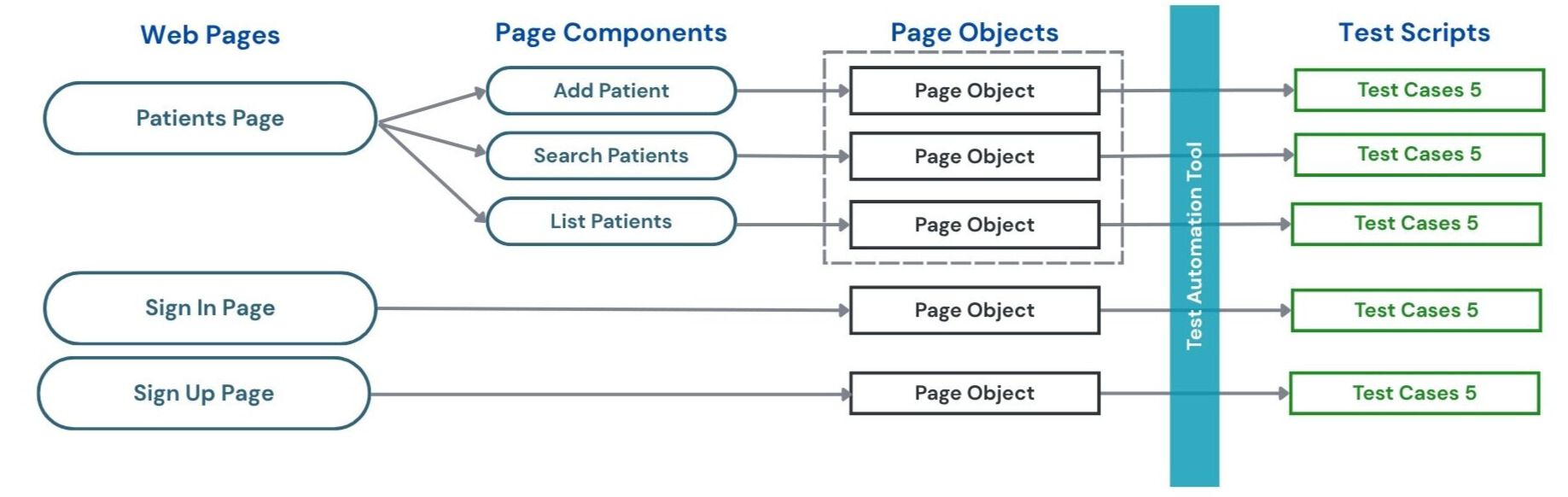
Example structure:
/pages
  inventory.page.ts
  cart.page.ts
  checkout.page.ts
  confirmation.page.ts
/tests
  cart.spec.ts
Each page class holds its locators and actions:
export class CartPage {
  constructor(private page: Page) {}
  async getItemCount() {
    return await this.page.locator('.cart_item').count();
  }
  async proceedToCheckout() {
    await this.page.locator('[data-test="checkout"]').click();
  }
}
And your test becomes cleaner:
test('Cart item management and checkout', async ({ page }) => {
  const cart = new CartPage(page);
  await cart.proceedToCheckout();
  expect(await cart.getItemCount()).toBe(2);
});
Result: Maintainable, scalable, and DRY test suites.
Putting It All Together: No-Code Testing with MCP
For manual testers or QAs, you can now run E2E tests without touching code.
By saving reusable prompts like manual_testing_prompt.md and running them via Copilot’s MCP integration, testers can execute whole test suites conversationally. Literally “Sit back and enjoy your coffee” while AI runs the suite for you.
What is MCP (Model Context Protocol)?
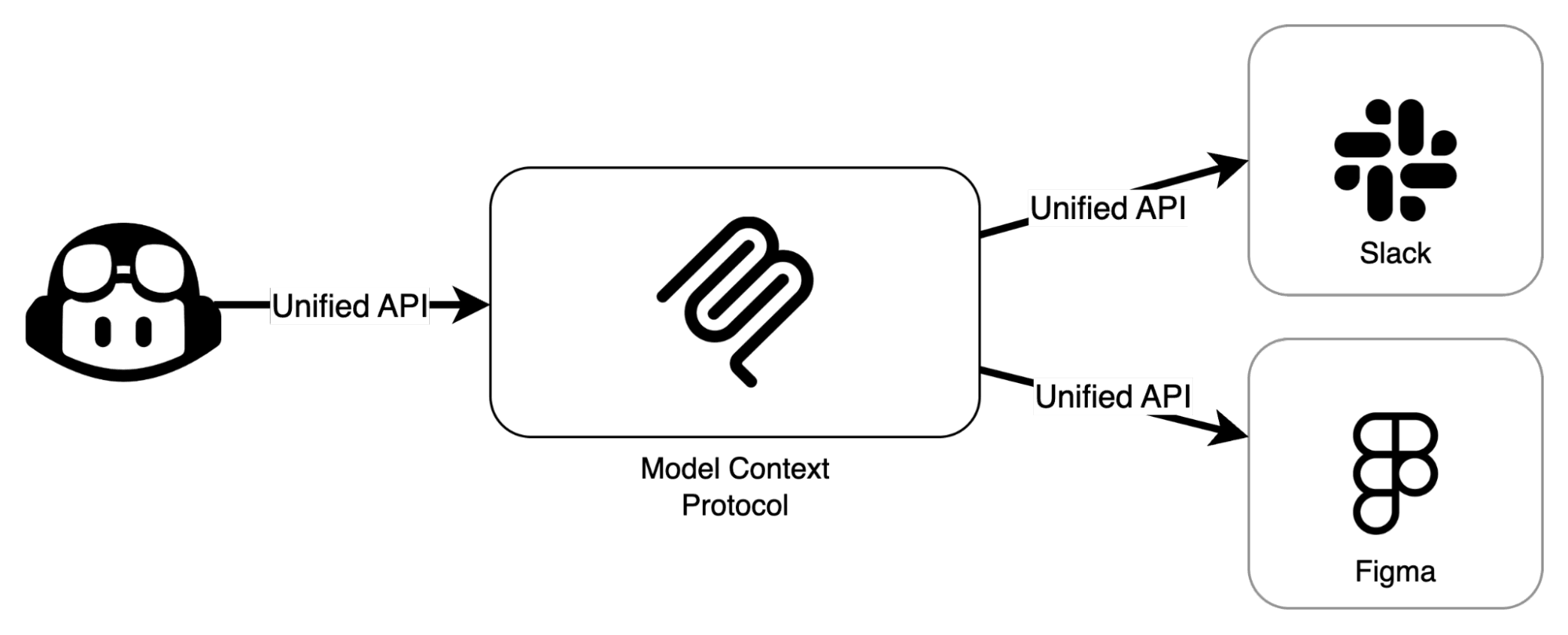
The Model Context Protocol (MCP) is an open standard that connects large language models (LLMs) with external tools and data sources in a structured, secure way. In simpler terms, MCP allows AI models like Copilot or GPT to interact with real-world applications directly without hardcoded integrations.
Think of it as the “USB‑C port for AI.” One universal connector that lets different AI agents plug into diverse systems, from APIs to browsers. Instead of developers writing custom interfaces for each tool, MCP defines a consistent language for communication between AIs and tools.
Key characteristics of MCP:
- •Standardized communication: Uses JSON-RPC for consistent data exchange between models and tools.
- •Secure access control: Ensures AI tools only perform authorized operations.
- •Tool modularity: You can add or remove tools (MCP servers) without rewriting integrations.
- •Context awareness: The AI can use tool outputs to refine future actions.
This design solves the classic M×N integration problem where each AI previously needed custom connections to every tool.
How MCP Works with Playwright
The integration of MCP with Playwright transforms browser automation into an AI-accessible service. The official Playwright MCP server exposes Playwright’s core capabilities through MCP so that AI agents can:
- •Launch browsers
- •Navigate to URLs
- •Interact with elements
- •Extract content
- •Run validations
Here’s how the architecture flows:
- •AI Host (Copilot, GPT, etc.) interprets user intent (e.g., “Test the login page”).
- •MCP Client sends structured JSON requests to the server (e.g., { "action": "navigate", "url": "https://app.demo.com" }).
- •Playwright MCP Server executes the Playwright commands (launches the browser, clicks, fills forms, etc.).
- •Response Handling sends structured results (like success, DOM state, or screenshots) back to the AI.
Because Playwright supports cross-browser automation (Chromium, Firefox, and WebKit), the MCP server inherits this flexibility, letting AI agents test or interact across multiple browsers programmatically.
Setting Up Playwright MCP in VS Code
Here’s a step-by-step example of using Playwright MCP with GitHub Copilot:
- •
Install the Playwright MCP server Visit microsoft/playwright-mcp and follow the setup guide.
- •
Open Command Palette in VS Code → “MCP: List Servers” → Select playwright → Click “Start Server”. This starts the MCP server, allowing AI tools like Copilot to use it.
- •
Enable Copilot Agent Mode
- •Choose a model such as Claude Sonnet 4..
- •Enable MCP tools in the tool selector.
- •Generate Tests via Prompts You can now talk to Copilot like this:
“Generate a Playwright test for logging into https://www.saucedemo.com, validating login failure messages, and saving a screenshot.”
Copilot will use the MCP server to:
- •Launch the Playwright browser
- •Execute each step
- •Return results or code suggestions in real-time.
- •Run or Refine Review Copilot’s generated code and run it locally via yarn playwright test or directly through the VS Code Playwright extension.
Why MCP + Playwright is a Game‑Changer
The synergy between MCP and Playwright is transforming how developers and QA teams approach testing:
- •AI‑Driven Test Generation: MCP enables Copilot or GPT to generate, execute, and refine tests autonomously no manual scripting needed.
- •Reusable Workflows: Once your MCP server is set up, it can be reused by multiple AIs or teams. The same protocol can support other tools like GitHub, Slack, or databases.
- •Improved Test Coverage: AI can explore UI paths that humans might overlook, building comprehensive coverage.
- •Secure & Governed: MCP integrates with access controls, ensuring that AI only executes allowed actions.
- •Agentic Testing: With MCP, AI doesn’t just write test code; it becomes an autonomous QA assistant capable of interpreting test results, adjusting inputs, and re‑running flows.
Best Practices and Considerations
While the Playwright + MCP ecosystem is powerful, it’s still evolving. Keep these points in mind:
- •Prompt Clarity Matters: The AI performs only as well as the instructions you give. Be explicit, e.g., “Verify that an error toast appears after invalid login.”
- •Manual Review is Essential: Always verify generated code before deploying. AI can make assumptions that don’t fit your actual app.
- •Secure the MCP Server: Since the server can perform browser actions, use network and token-level restrictions to avoid abuse.
- •Monitor Tool Outputs: Integrate logging to review every AI‑triggered action for auditing and debugging.
Final Thoughts: The New Era of E2E Testing
With Playwright’s Codegen, Copilot’s intelligence, and MCP’s connectivity, you’re no longer writing test scripts. You’re designing intelligent testing workflows.
This stack is:
- •Fast to start
- •Easy to maintain
- •AI-assisted for speed and scalability
- •Perfect for both developers and QA engineers
The future of testing isn’t just automated, it’s intelligent.
Resources
Share this article:
Let’s talk about how to transform your business.



Rootcode EU
Sakala tn 7-2,
Kesklinna linnaosa,
Tallinn,
Harju maakond,
10141, Estonia

Rootcode Sri Lanka
No. 42,
Level 15,
Nawam Mawatha,
Colombo 00200,
Sri Lanka






© 2026 Rootcode. All Rights Reserved