
How to Integrate AI Across Your Entire Development Workflow
Streamline your development workflow by integrating AI into every stage of the lifecycle. Learn to use AI agents for coding, context management for design, and automated PR reviews to boost engineering focus.

AI has become a standard part of the software development toolkit. But most teams are only using it in isolated parts of their workflow, which means they are getting a fraction of what it can actually do. Teams that invest time in understanding how these tools work, where they fit, and how to combine them are seeing real improvements across the entire development process. This is not about replacing developers. It is about removing the repetitive, rules-based work so engineers can focus on the parts that actually require judgment.
This guide walks through how to integrate AI at each stage of the software development lifecycle.
Start with Requirements and Documentation
AI can save significant time in the requirements and research phase, before the actual development and coding begins. On large products with years of accumulated documentation spread across multiple tools and formats, finding the right information manually is slow. Developers end up reading through pages of documentation just to understand the context of a feature before they can start building it.
A better approach is to use an AI assistant integrated directly into your project management and documentation tools. Instead of searching manually, developers can query the assistant in natural language. It surfaces relevant documentation, explains setup requirements, and points to the right test data for a given feature.
One thing to be careful about here is verifying the sources the AI uses for its answers. This is worth taking seriously. An AI assistant researching a payment processing standard might find an article about that standard transitioning from one format to a newer XML format and misread it as the system going offline entirely. If the developer does not already know enough about the topic to question the answer, that kind of mistake can influence a feature decision in the wrong direction. Always ask the tool to show its sources, especially when the answer matters.
Use an AI Agent for Development, Not Just Code Completion
There is an important distinction between an AI assistant and an AI agent, and understanding it changes how you approach development.
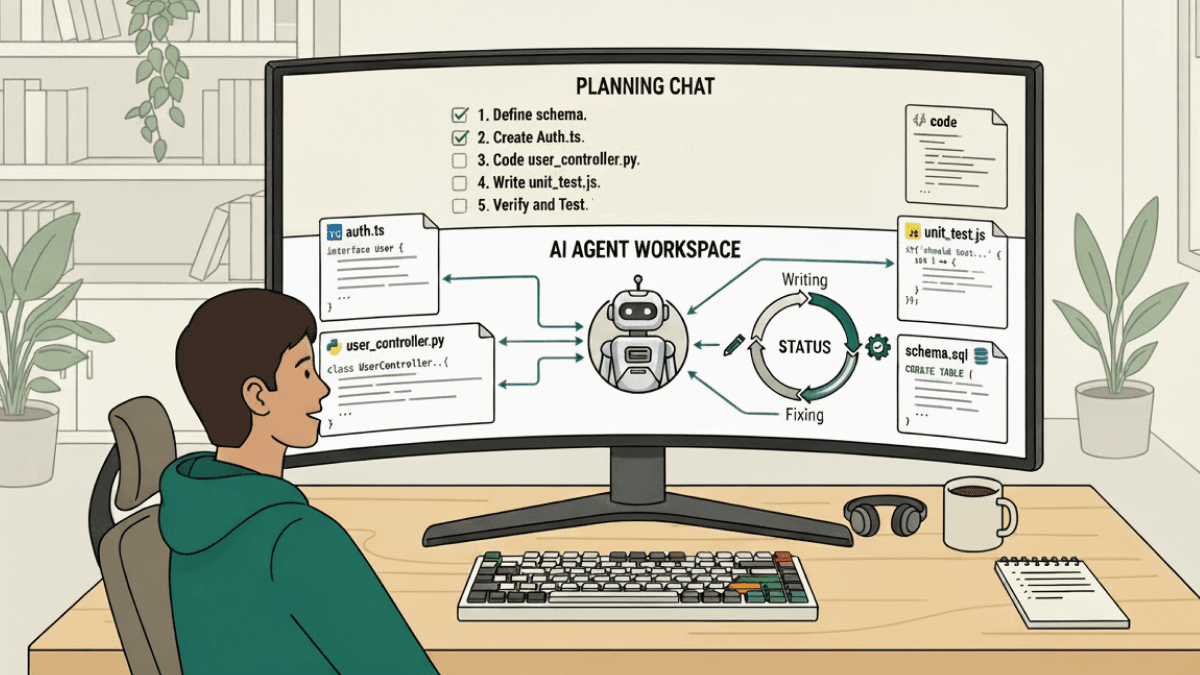
An AI assistant answers questions and suggests code inline. You are still doing the work. An AI coding agent takes a task, reads the project structure, proposes a plan, writes code across multiple files, runs tests, reads the errors, and fixes what broke, all on its own. You describe what you want and review what comes out.
The workflow that works well in practice is to use a conversational AI chat tool for planning and exploration, then hand the implementation off to a coding agent. Use the chat tool to understand unfamiliar code, explore approaches, and work through the problem before writing anything. Once you have a clear plan, give it to the agent and let it handle the execution.
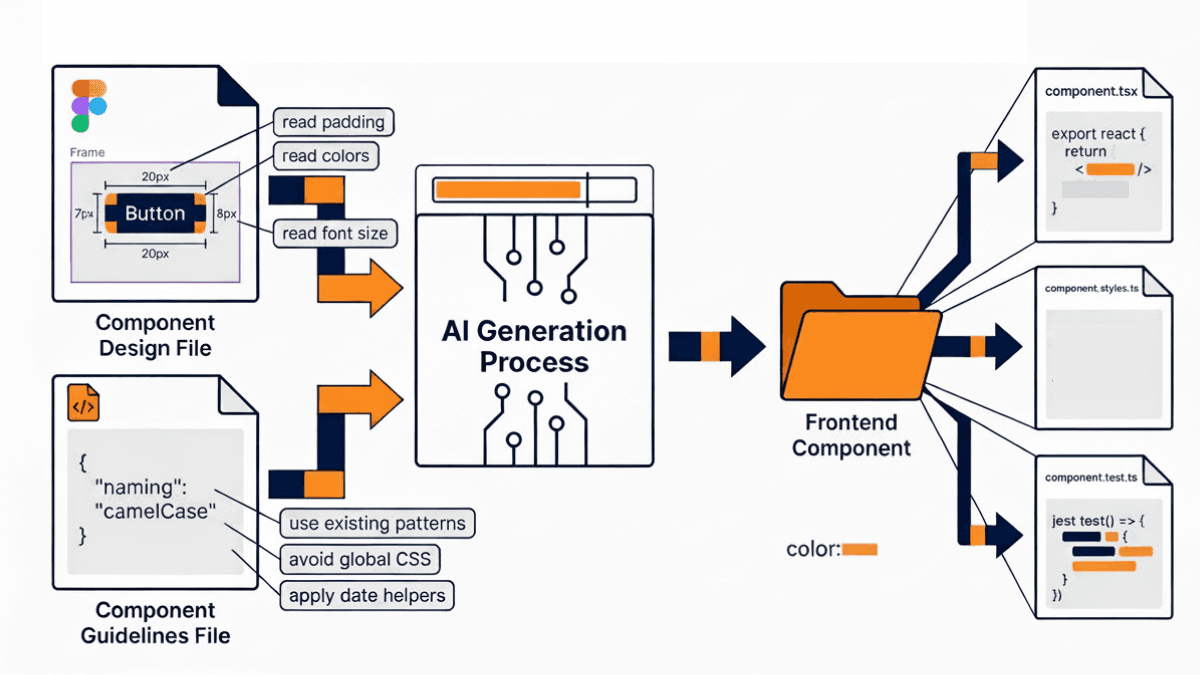
This combination keeps the developer in control of the approach while offloading the repetitive parts of implementation. The key is to configure the agent with a guidelines file that defines your team's conventions, naming standards, and patterns to avoid. Without this, the agent produces working code that may not fit your project. With it, the output aligns with your team's standards from the start without needing corrections afterwards. Configuring the guidelines file to enforce specific navigation patterns, date handling conventions, and component structure rules, for example, ensures every output matches your existing codebase rather than introducing inconsistencies that have to be cleaned up later.
Invest in Context Management on the Front End
On the front end, the quality of AI output depends heavily on how much context the model has when it starts working. AI tools that read only the file being edited produce suggestions that often require significant correction. Tools that read all relevant files during the planning stage produce output that fits the broader codebase from the beginning, which means fewer fixes after the fact.
If your IDE or AI tool supports multifile context during planning, use it. The investment in setting this up correctly reduces the amount of time spent correcting AI output significantly. One practical example of where this pays off is component generation from design files. By integrating your AI tool with your design system, the model can read padding, margins, font sizes, colors, and component structure directly from the design file and generate a front-end component that closely matches the original. This removes a significant amount of manual translation work between design and implementation.
Token management is another area that requires active attention. Every word passed to the model as context consumes tokens, and exceeding the context window causes the model to lose track of earlier context, which leads to incomplete or inconsistent output. A few simple practices help here: specify exact files rather than passing the entire codebase as context, copy only the relevant error lines rather than entire build logs, and break large refactors into smaller tasks within the same session.
At a project level, maintain a configuration file that gives the AI a summary of your project structure, conventions, and rules. This allows the model to orient itself quickly to the codebase rather than reading everything from scratch on each task. On large codebases with hundreds of routes and dozens of feature areas, maintaining this kind of global configuration file becomes essential for getting consistent output. A useful next step is to also add feature-specific versions of this file within individual feature folders, so the AI can orient itself even more precisely when working on a specific area of the product.
Build Custom AI Skills for Repetitive Engineering Tasks
Once you have established a working AI development setup, the next step is encoding your team's repeatable processes into custom skills. A custom skill is a reusable, parameterized workflow that can be triggered on demand to handle a specific engineering task consistently, every time.
Think about tasks in your workflow that are well-understood, repetitive, and rule-based. These are good candidates for a custom skill.
Accessibility implementation is a good example of this. Adding accessibility attributes to UI components requires reading each component, identifying interactive elements, applying the correct labels and roles, and updating translation files. When done manually this takes one to two days. A custom skill can handle the entire process automatically, reading the components, identifying interactive elements, applying the correct accessibility properties, and injecting the required strings into the project's translations file. What used to take days is reduced to a couple of hours of AI execution with a developer reviewing the output.
Other useful skills to consider building include one that sets up a new feature folder with the correct structure, one that implements API endpoints following your team's established patterns, and one that generates domain classes from a given set of types. The goal in each case is the same: take a task your team already knows how to do, encode your conventions into the skill, and let the AI handle the execution while a developer reviews the result.
Add AI as a Pre-Review Layer for Pull Requests
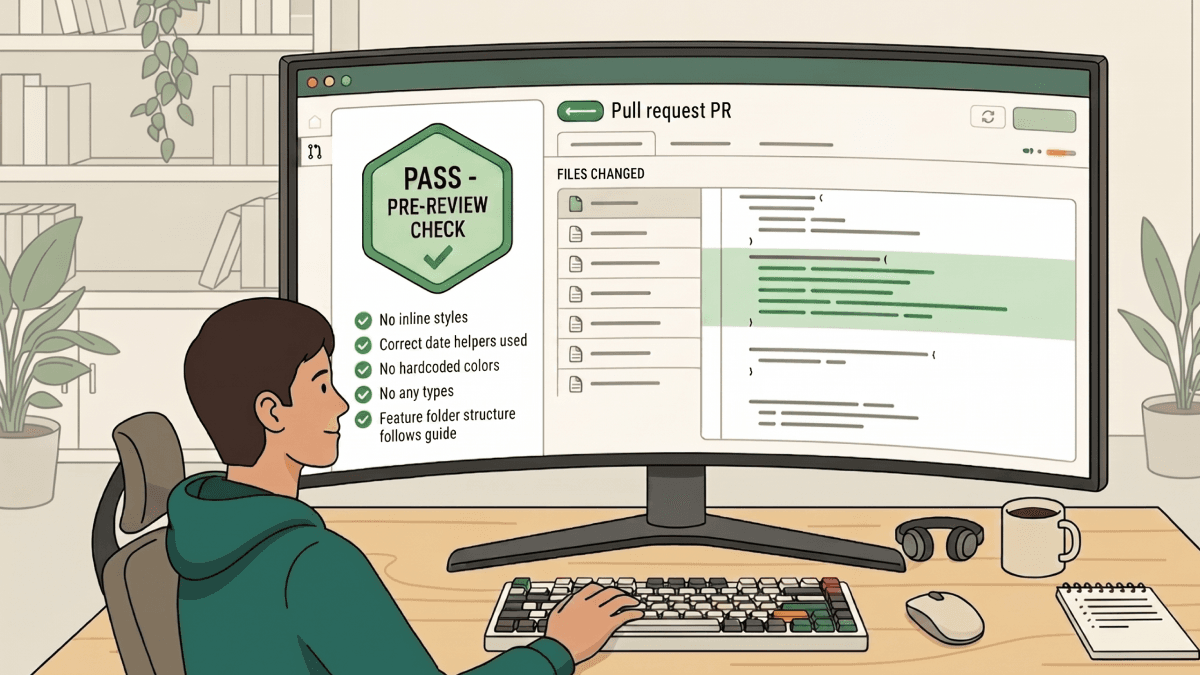
The final place to integrate AI is in the code review process. Before a pull request is opened for human review, run it through an automated check configured with your team's specific standards.
The way this works is straightforward. You define a set of rules in a configuration file written in plain English. Things like: avoid inline styles, do not use hardcoded colors, do not use any type, use the project's date helper rather than importing a date library directly. When a pull request violates any of these rules, the check fails and the developer gets line-specific feedback on exactly what needs to be corrected.
This is particularly valuable on codebases undergoing a migration, like a JavaScript-to-TypeScript conversion, where pull requests regularly touch 20 to 50 files and reviewers end up spending most of their time catching small consistency issues that keep recurring across every PR. After introducing automated pre-review checks, those recurring comments disappear. By the time a pull request reaches a human reviewer, the basic standards have already been verified and the reviewer can focus entirely on business logic, user experience, and overall quality.
It is worth being clear about what this automation does and does not do. It does not understand business requirements. It cannot assess whether a change solves the right problem or whether the approach makes sense in context. It handles consistency so that reviewers can focus on what actually requires their expertise.
Putting It All Together
The pattern that runs through all of these integrations is the same. AI handles the parts of development that are well-defined and repetitive. Developers stay responsible for the parts that require judgment, context, and understanding of what the product actually needs to do.
The tools work best when configured thoughtfully. Guidelines files, instruction files, context files, and custom skills all require upfront investment. It is also worth noting that most AI tools operate on usage-based pricing, so factor in credit consumption when planning how heavily your team relies on agentic workflows. The teams that get the most value are the ones that have encoded their standards and conventions into the configuration, not the ones expecting the tools to figure it all out from scratch. Start with one stage of your workflow, get it right, and build from there.
The teams seeing the biggest gains are not the ones using the most tools. They are the ones who have configured them well.
Rootcode works with organizations and governments across industries to design, build, and scale software products. If you have a technology challenge you are trying to solve, we would love to hear about it.
Share this article:
Let’s talk about how to transform your business.



Rootcode EU
Sakala tn 7-2,
Kesklinna linnaosa,
Tallinn,
Harju maakond,
10141, Estonia

Rootcode Sri Lanka
No. 42,
Level 15,
Nawam Mawatha,
Colombo 00200,
Sri Lanka






© 2026 Rootcode. All Rights Reserved