
How Kubernetes Works: A Practical Guide to Container Orchestration
Learn how Kubernetes works with this practical guide to container orchestration. Understand core concepts like pods, deployments, scaling, and networking to manage applications efficiently at scale.
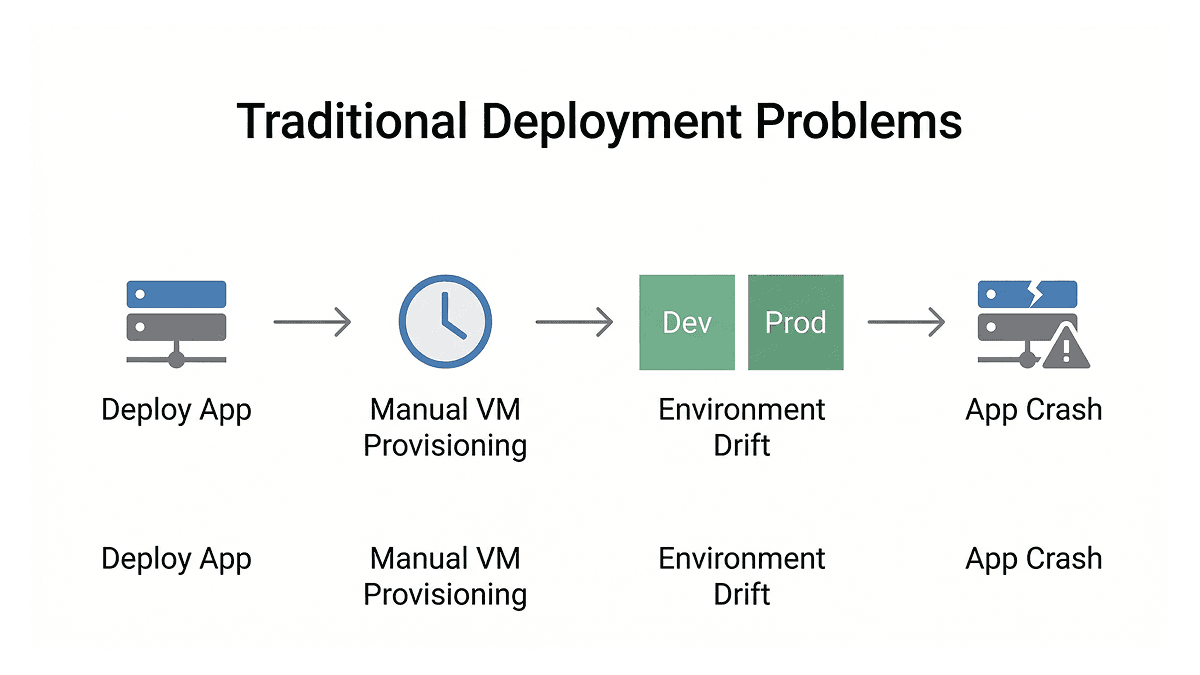
Earlier, deploying software used to be a painful process. You packaged your application, shipped it to a server, and hoped the environment matched what you had locally. When traffic spiked, someone had to manually provision new virtual machines, which could take hours. Dev and production environments would slowly drift apart over time, causing applications to break in ways that were hard to trace.
Containers helped solve the portability problem. Docker, introduced in 2013, gave developers a standardized way to package applications so they could run consistently across environments. But once you have hundreds or thousands of containers running across multiple servers, a new challenge appears: how do you manage all of them? How do you make sure they restart when they crash, scale when load increases, and update without taking your service down? That is exactly the problem Kubernetes was built to solve.
How Kubernetes Came to Exist
Google had been running containerized workloads internally since the early 2000s, long before Docker existed. Their internal system, called Borg, scheduled and managed workloads across massive clusters. Every Google Search query, Gmail message, and YouTube video ran through it. A follow-up system called Omega came later, improving on Borg's architecture.
When Docker brought containers to the wider industry, Google took the lessons from Borg and Omega and released Kubernetes as an open-source project in June 2014. Today, according to a 2023 CNCF survey, 84% of organizations running containers use Kubernetes [1]. It runs on every major cloud platform including AWS with EKS (Elastic Kubernetes Service), Google Cloud with GKE (Google Kubernetes Engine), and Azure with AKS (Azure Kubernetes Service), and it can also run on your own data center hardware.
What Kubernetes Actually Does
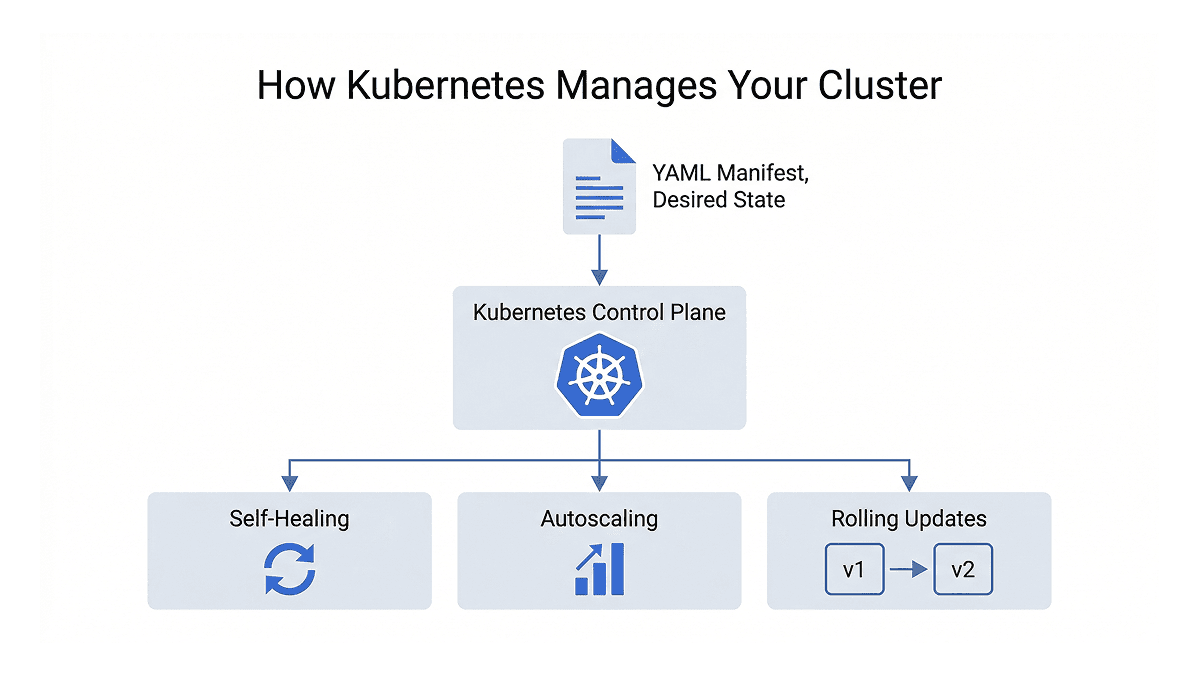
Kubernetes is a declarative system. Instead of writing scripts that tell a server step by step how to deploy your application, you write YAML configuration files called manifests that declare the desired state of your system. Kubernetes then continuously watches your cluster and makes sure reality matches what you declared. If something changes or breaks, it corrects it automatically.
This model enables a few things that matter a lot in production environments.
Self-healing means that if a container crashes, Kubernetes restarts it automatically without any manual intervention. You declare that you want two replicas of your application running, and Kubernetes makes sure those two replicas are always running, even at 3 AM when no one is watching.
Autoscaling lets you define load thresholds, and Kubernetes scales your application up or down automatically based on traffic. This is handled by the Horizontal Pod Autoscaler, or HPA, which monitors resource usage and adjusts the number of running instances accordingly.
Built-in networking gives every service in your cluster a stable DNS name. Services communicate by name rather than IP addresses, which matters because container IPs change every time they restart. Kubernetes handles all underlying routing, abstracting away network complexities.
Zero-downtime deployments mean that when you push a new version of your application, Kubernetes rolls it out gradually. New containers come up while old ones are safely stopped, keeping your service available throughout the process. If something goes wrong, rolling back to the previous version takes a single command.
The Core Building Blocks
To work effectively with Kubernetes, you need to understand its core objects and what each one is responsible for.
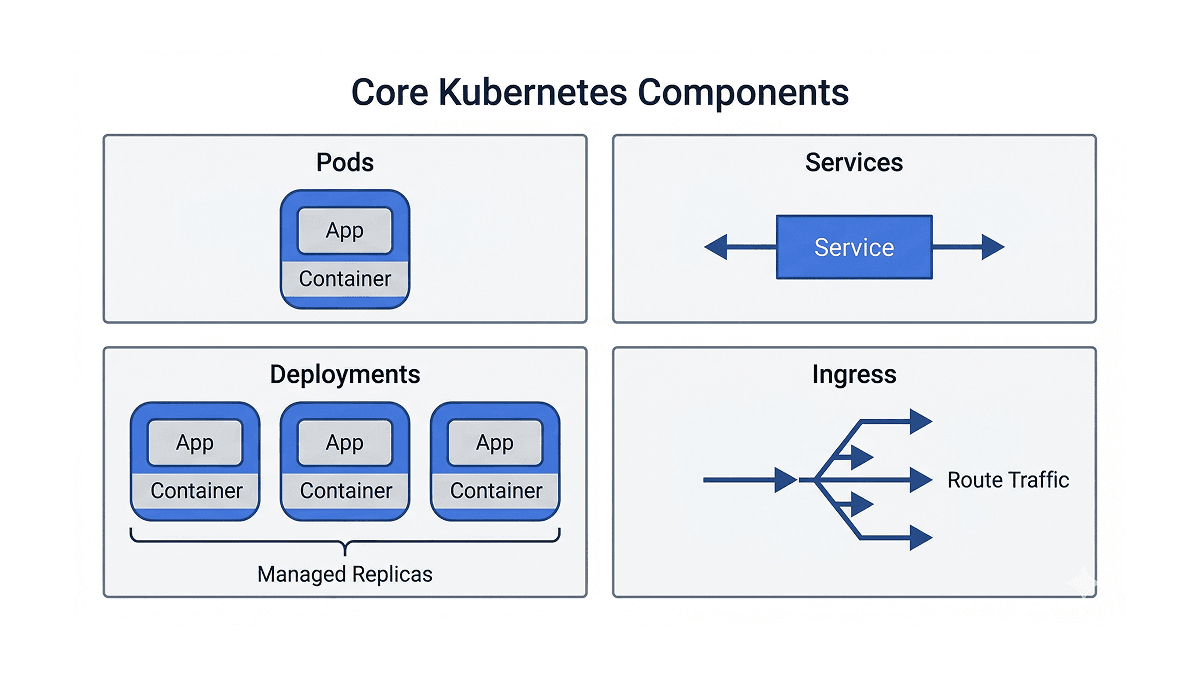
Pods are the smallest unit in Kubernetes. A pod is a wrapper around one or more containers that share the same network and storage. In most cases, a pod runs a single container. Pods are ephemeral by design, meaning they can crash, get replaced, and rescheduled at any time. You rarely create pods directly in practice.
Deployments are what you actually use day to day. A deployment lets you declare a desired state for your application, for example "run three copies of this container image at all times." Kubernetes takes responsibility for maintaining that state. If a pod goes down, the deployment controller picks this up and starts a new one to bring the cluster back to its declared state. Deployments also manage rolling updates, so changing your container image triggers a controlled rollout rather than a sudden restart of everything at once.
Services solve a core networking problem. Since pod IP addresses change every time a pod restarts, you cannot hardcode them anywhere. A service sits in front of your pods and provides a stable endpoint. Other parts of your application communicate with the service name, and service handles load balancing across whatever pods are currently healthy.
Ingress handles incoming traffic from the internet. If services are the doors into your application, ingress is the front desk that decides which door each request goes through. Instead of exposing multiple services separately to the internet, you define routing rules in one place: requests to /api go to the API service, requests to / go to the frontend. An ingress controller like nginx sits inside the cluster, reads those rules, and routes traffic accordingly.
ConfigMaps and Secrets handle configuration separately from your application code. Database URLs, feature flags, API endpoints, passwords, and tokens should not be baked into a container image. ConfigMaps handle non-sensitive configuration while Secrets handle sensitive data. Both get injected into pods as environment variables or mounted files at runtime. One thing worth noting is that Kubernetes Secrets are only base64-encoded by default, not encrypted. In production, tools like Sealed Secrets build on top of this by adding proper encryption, so that secret values are safe even inside your Git repository.
Volumes handle persistent storage. By default, anything written inside a container disappears when it stops, which is fine for stateless applications but a problem for databases and other stateful workloads. Kubernetes introduces PersistentVolumes (PVs) to represent actual storage backends like cloud disks or network file systems, and PersistentVolumeClaims (PVCs) as the way pods request that storage. A pod claims the storage it needs and Kubernetes binds it to an appropriate volume, without the pod needing to know anything about the underlying infrastructure.
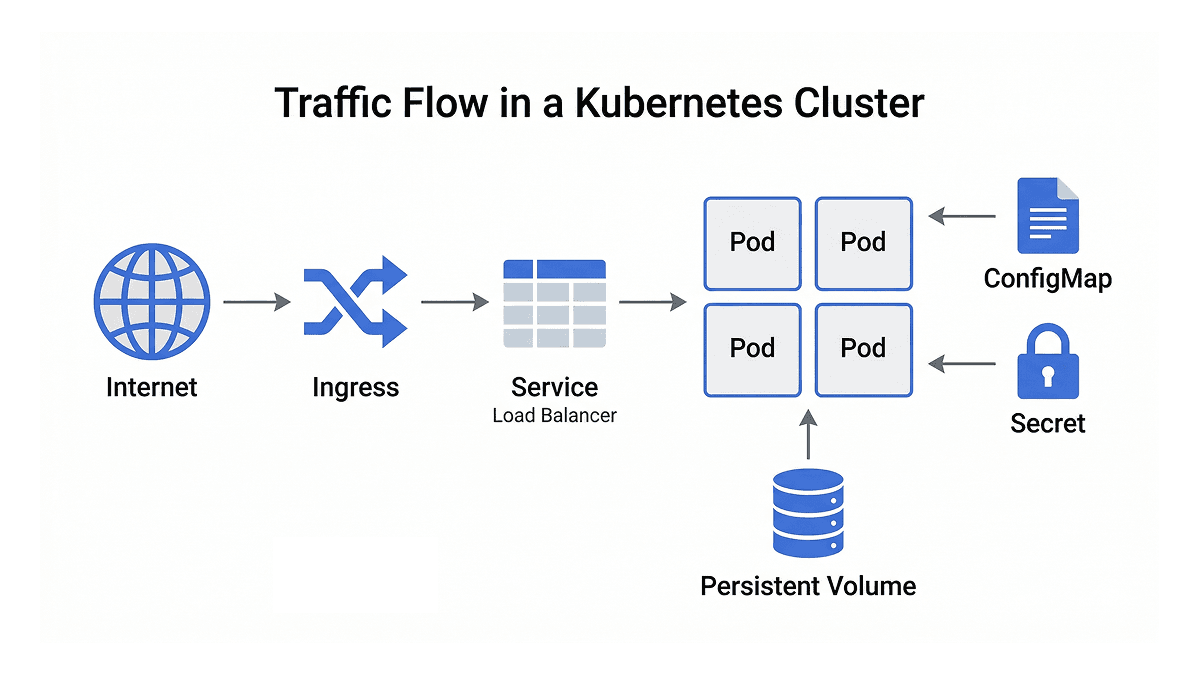
How Traffic Flows Through a Cluster
When you put these pieces together, the flow of a production Kubernetes cluster becomes clear. A request from the internet hits the ingress, which reads its routing rules and forwards the request to the right service. The service load-balances traffic across the healthy pods in its deployment. Those pods pull their configuration from ConfigMaps and Secrets, run your application, and write any persistent data to volumes.
Each object has a specific responsibility, and that separation is what makes the system both reliable and straightforward to debug. When something breaks, you know which layer to look at.
Helm and ArgoCD: Managing Kubernetes at Scale
Kubernetes handles orchestration, but most production setups layer additional tooling on top of it.
Helm is the package manager for Kubernetes. As your application grows, managing dozens of YAML files across multiple environments like development, staging, and production becomes complex. Helm packages all of your Kubernetes manifests into reusable units called charts, bundling everything an application needs into one deployable package. A values file holds environment-specific configuration, and a single command deploys the full stack to any environment. Artifact Hub, which is a public registry for various package formats, hosts thousands of community-maintained charts for common software like databases, monitoring tools, and message queues, so you rarely need to start from scratch.
ArgoCD handles the deployment workflow. In production, you do not want engineers running kubectl apply commands manually as there is no audit trail, no review process, and human error becomes a real risk. ArgoCD implements a GitOps model, where Git becomes the single source of truth for your entire cluster state. Instead of running manual commands, you merge a change into your repository to a specific branch you have defined and ArgoCD takes care of syncing the cluster to match the desired state in Git. When a change is merged, ArgoCD detects the difference between what is in Git and what is running in the cluster, and syncs them automatically. If someone manually changes something directly in the cluster, ArgoCD detects that drift and reverts it. Git becomes the single source of truth and every change has a commit tied to it.
Getting Started with Kubernetes Locally
The easiest way to try Kubernetes without a cloud environment is Minikube, which runs a single-node cluster on your local machine. Similar tools like kind (Kubernetes IN Docker) and k3d offer lightweight alternatives, and Docker Desktop also ships with built-in Kubernetes support.
Your main interface with the cluster is kubectl, the command line tool that talks to the Kubernetes API server, which is the central control plane that manages everything running in the cluster. Six commands cover the majority of day to day work: get to list resources, describe to inspect a specific resource in detail, apply to deploy or update from a manifest file, delete to remove resources, logs to stream output from a running container, and exec to open a shell inside a container for debugging.
Wrapping Up
Kubernetes is the standard for container orchestration, solving operational problems that previously required significant manual effort or custom tooling. Automated recovery, declarative configuration, scalable deployments, and stable networking all come built in. The learning curve takes time, particularly around networking and storage. Understanding the Kubernetes mental model provides a platform proven at scale across the industry, supported by a rich and practical community ecosystem.
At Rootcode, we build and manage production-grade infrastructure that scales with real-world demands. If you are looking to modernize your deployment workflows or need help getting your applications running reliably in production, we can help. Let's talk!
Share this article:
Let’s talk about how to transform your business.



Rootcode EU
Sakala tn 7-2,
Kesklinna linnaosa,
Tallinn,
Harju maakond,
10141, Estonia

Rootcode Sri Lanka
No. 42,
Level 15,
Nawam Mawatha,
Colombo 00200,
Sri Lanka






© 2026 Rootcode. All Rights Reserved