
UX and SEO: How User Experience Directly Impacts Your Rankings
Learn how user experience directly impacts your search rankings. From page speed to mobile design, discover the UX factors Google measures and how to improve them.

Search engine optimization has changed a lot over the years. In the early days, ranking high on Google was mostly about stuffing the right keywords into your content and building as many backlinks as possible. That approach no longer works the way it used to. Today, Google pays close attention to how people actually behave on your website, and that behavior is shaped almost entirely by your user experience (UX).
UX refers to how easy, intuitive, and satisfying it is for someone to use your website. It covers everything from how fast your pages load, to how clearly your content is laid out, to whether your site works properly on a phone. When users find a website easy to navigate and engaging, they tend to stay longer, which reduces bounce rates and signals to search engines that the site offers value. In short, a website that is good for people is increasingly a website that ranks well.
This article breaks down exactly how UX affects your SEO performance, which specific factors matter most, and what you can do to improve both at the same time.
Why Google Cares About User Experience
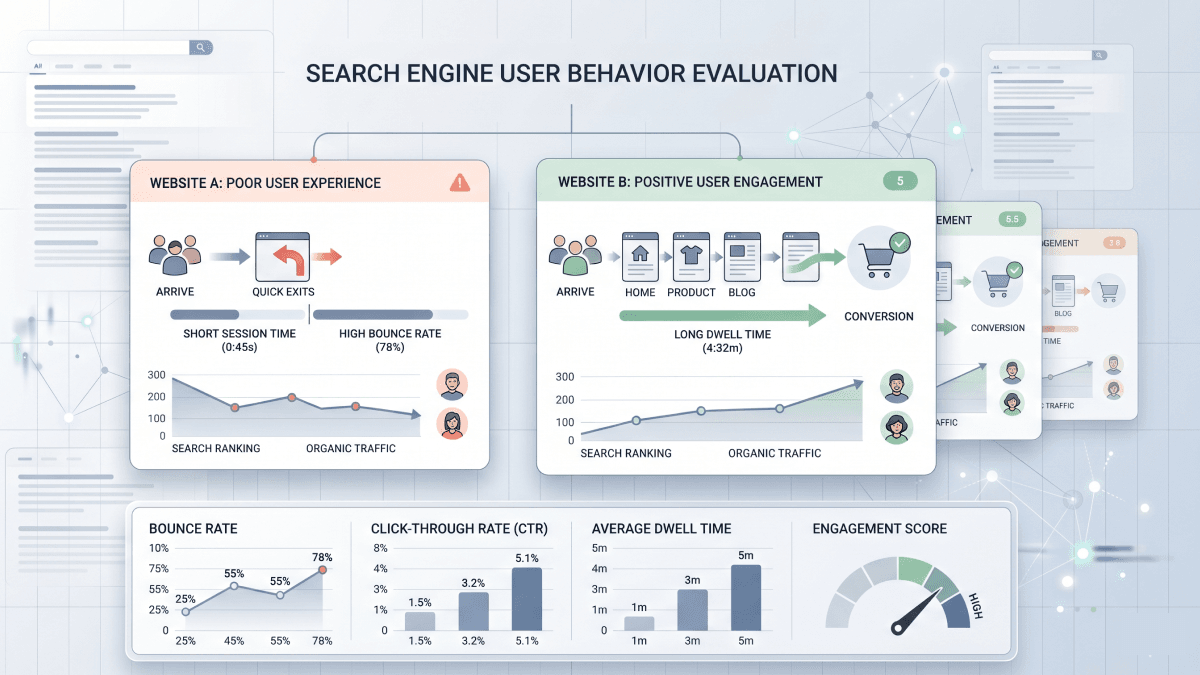
Google's core job is to point people toward the most useful and relevant results possible. To figure out which pages deserve to rank, Google does not just evaluate your content in isolation. It also factors in engagement signals that reflect how satisfied users are with what they find. A user who clicks through from the search results and leaves immediately is a sign that the page did not deliver. A user who clicks through, visits multiple pages, and eventually converts is a sign that it did, and pages that consistently produce those outcomes tend to earn better visibility over time.
Google's ranking algorithms have evolved well beyond keyword relevance. Today, page speed, mobile usability, accessibility, and overall user experience are factors that play a crucial role in search rankings. This shift means that even if your content is excellent, a poorly designed website will limit how far it can climb in the rankings.
UX itself is not a direct ranking factor in the traditional sense. However, great user experience indirectly impacts key metrics that search engines consider when determining rankings, including bounce rates, click-through rates, dwell time, and overall engagement, all of which indicate that users find the website valuable.
Page Speed: The Foundation of Good UX
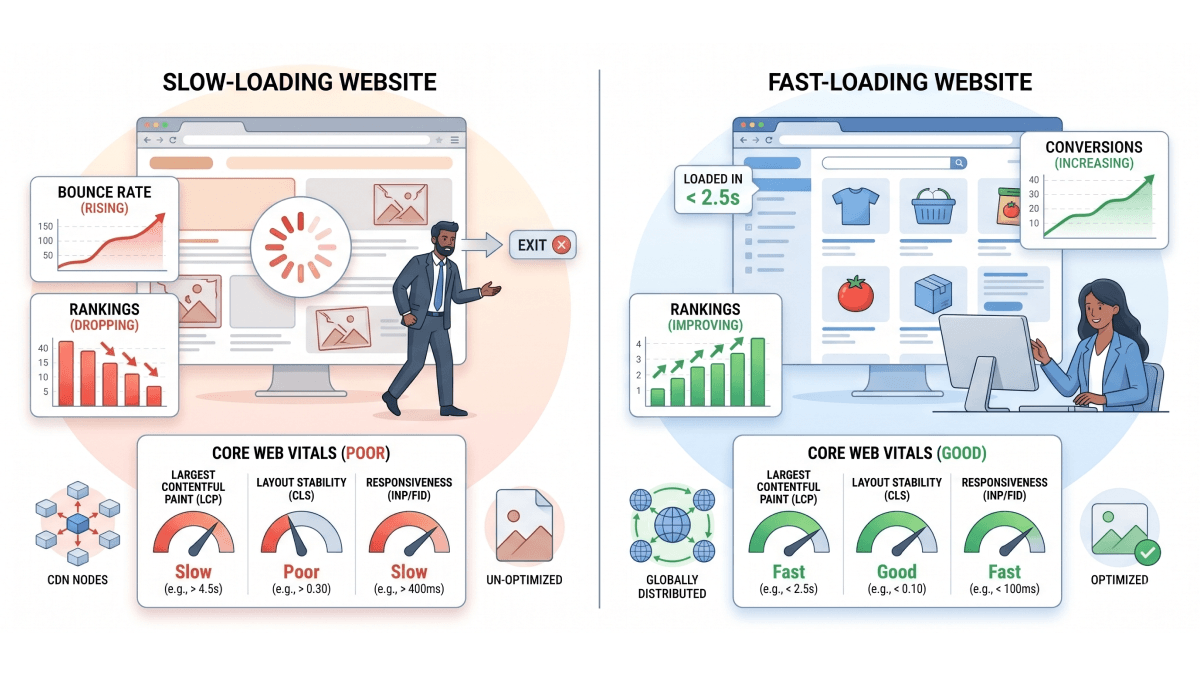
Nothing kills a user's interest faster than a slow website. People expect pages to load quickly, and when they do not, they leave. Slow websites do not just frustrate users; they cost rankings, revenue, and user trust.
The numbers make this very clear. Pages that load in one to two seconds have an average bounce rate of just 9%, while pages that take five seconds to load have a bounce rate of 38%. That is a difference caused by just a few seconds [1]. And it gets worse the longer your site takes. A one-second delay in page load speed results in a 7% loss in conversions, and a one-second delay in load time leads to a 16% drop in user satisfaction [2].
Google measures page speed as part of a set of performance benchmarks called Core Web Vitals. These are specific metrics designed to capture how a real user experiences the speed and stability of a page. One of the most important is Largest Contentful Paint (LCP), which measures how long it takes for the biggest visible element on a page, such as a headline or hero image, to fully load. Ideally, your page speed should be less than 2.5 seconds [3]. A fast-loading site reduces bounce rates and signals quality to search engines.
Here are some practical ways to improve your page speed:
- •Compress and resize images before uploading them, as unoptimized images are one of the most common causes of slow load times.
- •Use a content delivery network (CDN) to serve files from servers closer to your users, reducing the physical distance data has to travel.
- •Enable lazy loading so images and videos only load when a visitor scrolls down to them, rather than all at once when the page first opens.
- •Minimize unnecessary scripts and plugins that add weight to your pages without adding value for the user.
Page Speed
Mobile Optimization: No Longer Optional
More than half of all web traffic now comes from mobile devices. Mobile devices account for over half of global web traffic, driving nearly 62% of visits in early 2025 [4]. Because of this shift, Google has moved to mobile-first indexing, which means it primarily looks at the mobile version of your site when deciding how to rank it.
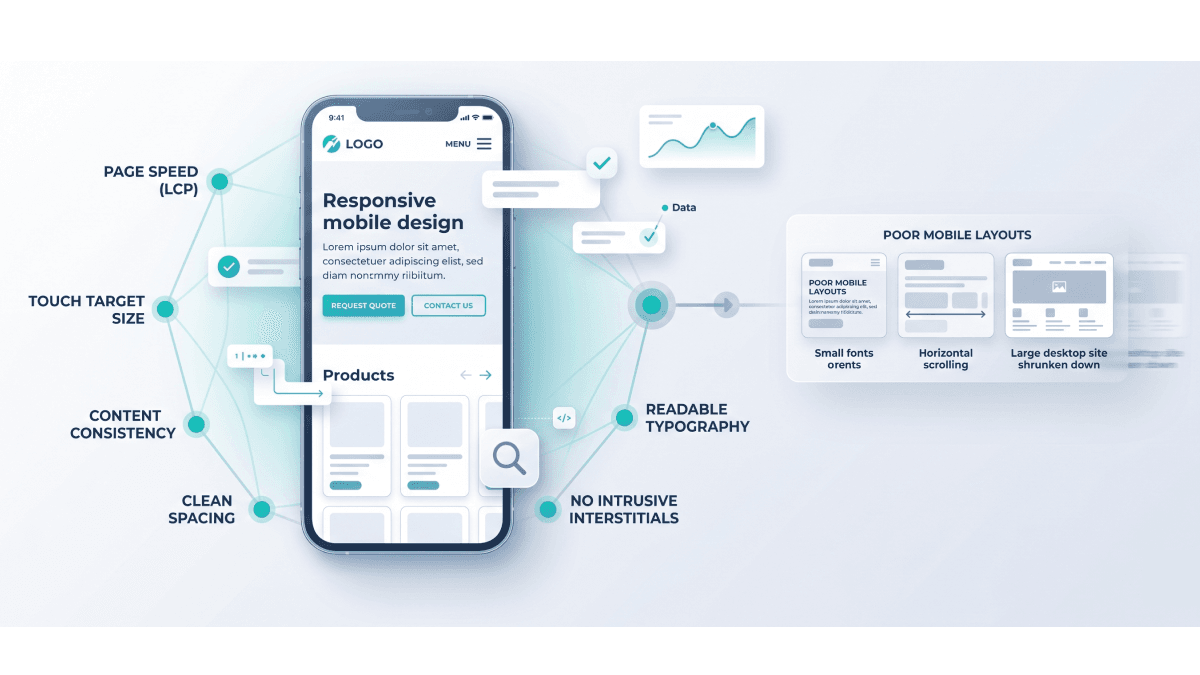
Mobile optimization enhances the user experience across all devices while directly impacting search rankings. Websites that are not optimized for mobile risk lower visibility in search results. A responsive design, one that adapts cleanly to any screen size, is the most reliable way to handle this.
Beyond just fitting the screen, mobile UX comes down to the finer details. According to a mobile UX study by the Baymard Institute, 82% of mobile websites have tappable elements placed too closely together, making it difficult for users to navigate the mobile interface [5]. Buttons need to be large enough to tap easily, text needs to be readable without zooming, and layouts should not feel cramped. These small details determine whether a mobile visitor stays or leaves within the first few seconds.
To make your site work well on mobile, focus on these areas:
- •Use a responsive design framework so your layout adapts automatically to different screen sizes.
- •Make buttons and tap targets large enough to press without accidentally hitting something nearby.
- •Keep text readable without zooming, with a font size of at least 16px for body content.
- •Ensure pop-ups are easy to dismiss on smaller screens, as intrusive overlays are a common reason mobile users abandon a page.
Navigation and Site Structure
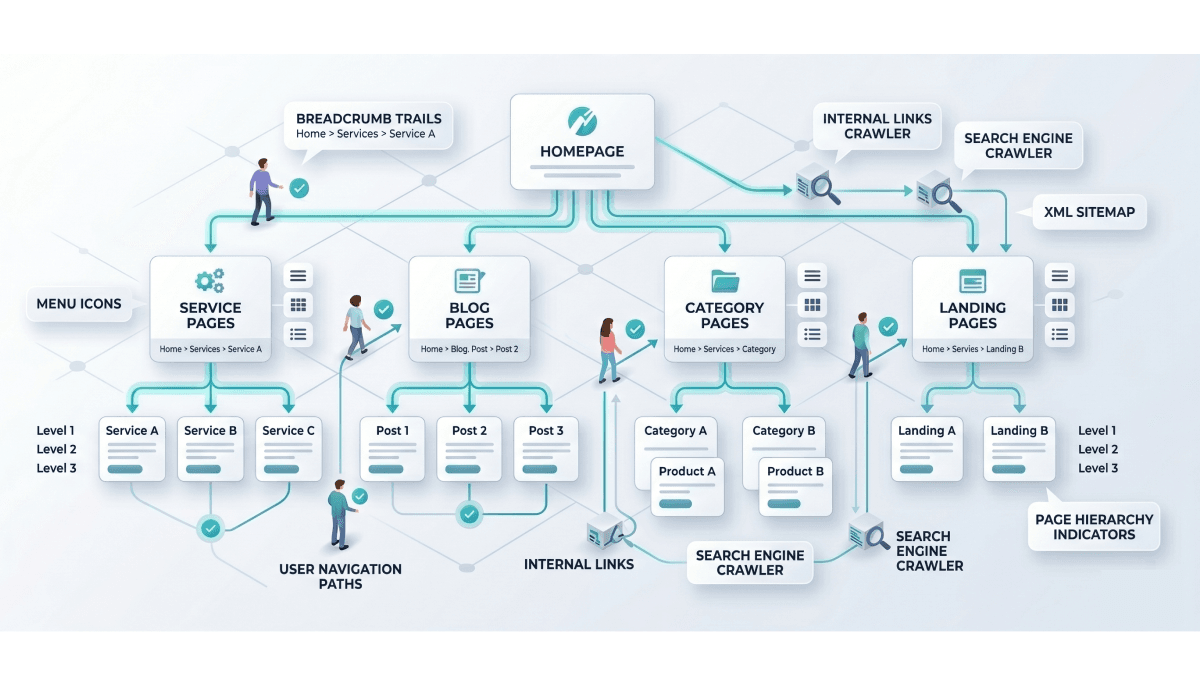
How well your site is organized has a direct effect on both user satisfaction and search engine performance. When someone lands on your website, they should be able to find what they are looking for without effort. If users cannot find what they want quickly, they will leave, and so will your rankings.
Intuitive navigation and internal linking guide both users and search engines through a site's most important content. This also boosts time on site, page views, and the distribution of link equity across your pages. Use clear labels in your navigation menus, avoid burying important pages under too many layers of clicks, and make sure your internal links connect related content logically.
Page structure also plays a role. Breaking up your content with headings, short paragraphs, and clear sections makes it easier to skim and read. This keeps users engaged for longer, and it also helps Google understand the hierarchy and focus of your content.
Bounce Rate and Dwell Time
Two of the most telling signals Google picks up from user behavior are bounce rate and dwell time. Bounce rate is the percentage of visitors who land on a page and leave without clicking anything else. Dwell time is how long a user spends on your site before going back to the search results.
Once a visitor lands on your site, their decision to stay or leave is typically made within a matter of seconds. If the website fails to meet their expectations by loading slowly, being difficult to use, or not aligning with their search query, the user will leave. Each instance of this means a missed opportunity to engage visitors and guide them through your marketing funnel.
A high bounce rate tells Google that users are not finding what they came for, which can push your rankings down over time. Improving your UX directly addresses this. When your site loads fast, looks clean, and delivers on what your page promised in the search results, users stick around longer and explore more pages.
Content That Matches Search Intent
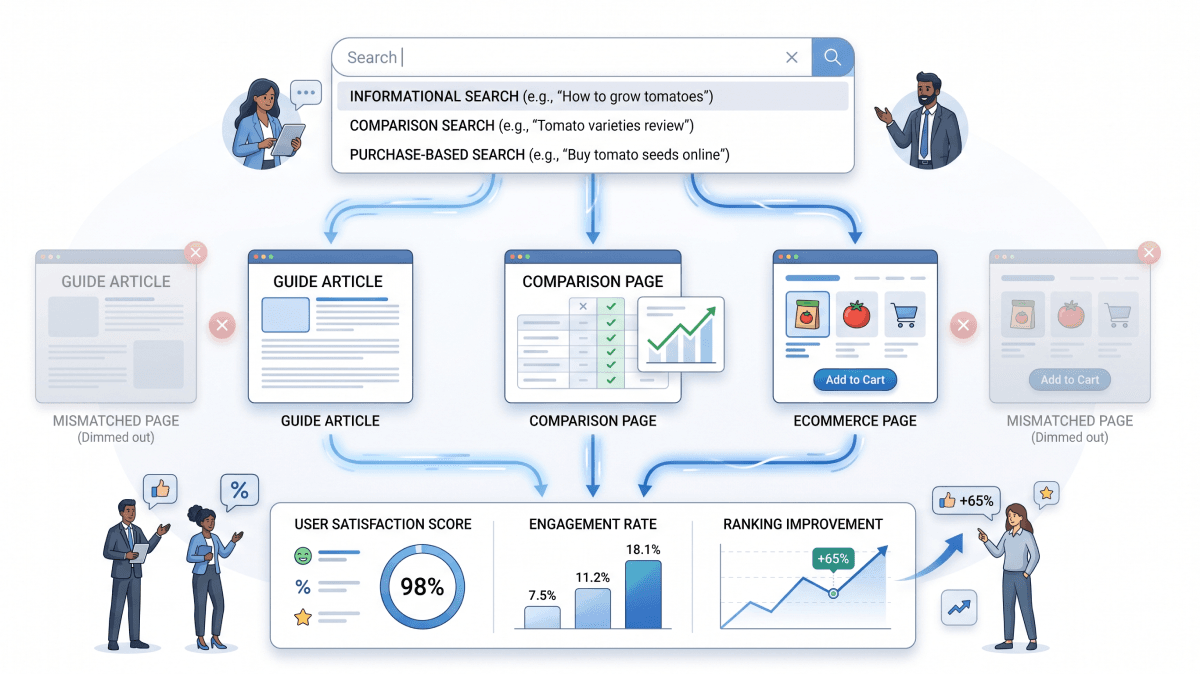
Good UX is not just about design. It is also about making sure your content actually answers what someone was looking for when they searched. This is called search intent, and aligning with it is one of the most impactful things you can do for both your users and your rankings.
By matching content to user expectations, you create a more relevant, engaging experience that keeps visitors on your site longer and increases the likelihood of conversions. To align with search intent properly, ask yourself these questions before publishing any page:
- •What is the user actually trying to do? Are they looking to learn something, compare options, or make a purchase? Your content format should match the goal.
- •Does the page deliver on its title? If your headline promises a guide, the page should read like one, not like a sales pitch halfway through.
- •Is the most important information easy to find? Users should not have to scroll past blocks of unrelated content to get the answer they came for.
Intrusive Pop-ups and Disruptive Elements
Pop-ups are a common way to capture email addresses or promote offers, but when used poorly, they hurt both user experience and SEO. Aggressive pop-ups are not just annoying; they can result in ranking penalties since they disrupt the user experience. It is best to use them wisely, ensuring they do not block critical content, and making the exit button easy to find.
If you use pop-ups, apply a time delay so the user has had a moment to settle into the page before seeing one. Make sure they are relevant to where the user is in their journey, and always test how they appear on mobile.
Accessibility and Its SEO Benefits
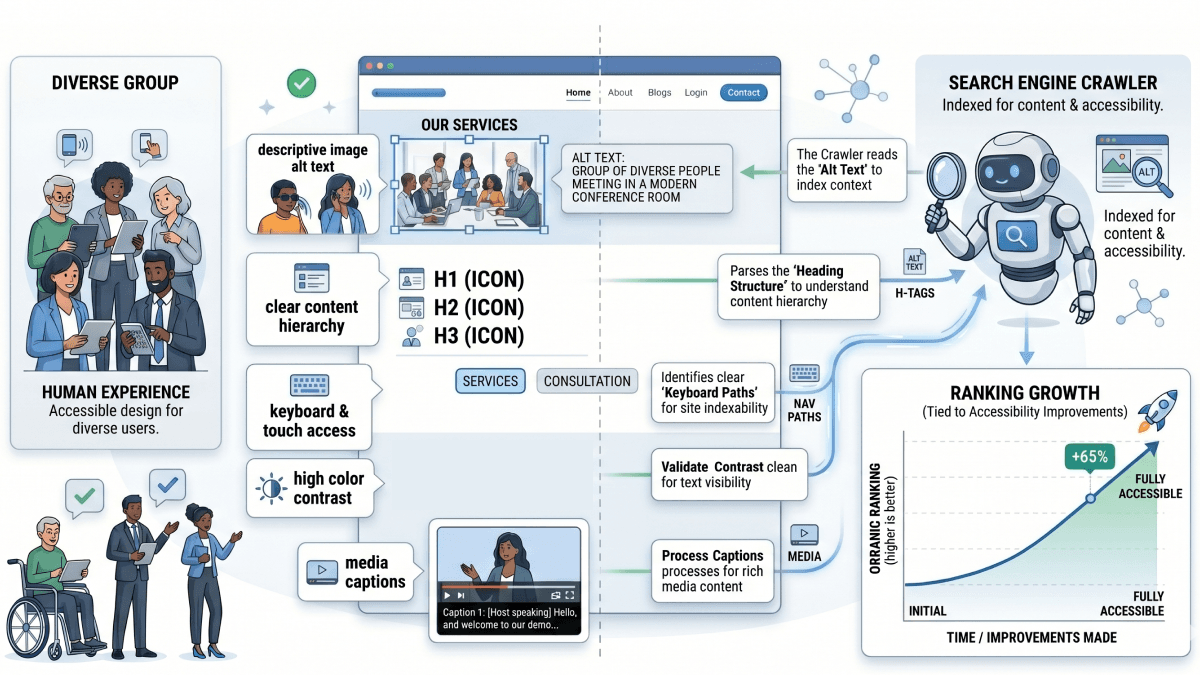
Website accessibility means building a site that everyone can use, including people with visual, hearing, or motor impairments. While this is the right thing to do on its own merits, it also has real SEO benefits. Semantic HTML, alt text, and inclusive design do not just help users; they help search engine crawlers understand and navigate your content as well.
Some of the most effective accessibility improvements are also great for SEO:
- •Add descriptive alt text to all images so both screen readers and search engine crawlers can understand what each image shows.
- •Use heading tags in the correct order (H1, H2, H3) to create a clear content hierarchy that is easy for both users and Google to follow.
- •Ensure the site can be navigated by keyboard without needing a mouse, which benefits users with mobility impairments and also reflects well-structured HTML.
- •Keep contrast ratios high between text and backgrounds so content is readable for users with visual impairments.
Measuring UX for SEO Success
Improving UX requires knowing where your current experience is falling short. Some effective ways to measure UX performance include conducting user testing by observing how real users navigate your site, using heatmaps to see where people click and where they ignore, and analyzing bounce rates to identify pages where visitors are not finding what they need.
Google Search Console and Google Analytics are free tools that surface a lot of this data. Core Web Vitals reports in Search Console show you exactly which pages are underperforming on speed and stability. Heatmap tools like Hotjar or Microsoft Clarity can show you where users drop off or where they get confused. Together, these give you a clear picture of where to focus your improvements.
The Bigger Picture
A positive user experience builds trust and encourages repeat visits, increasing the likelihood of content sharing and brand loyalty. These actions contribute to long-term SEO benefits by generating more organic traffic and reinforcing the site's authority, helping it maintain strong rankings over time.
The sites that rank consistently well are the ones that users genuinely enjoy visiting. They load fast, they work on every device, they are easy to navigate, and they deliver exactly what they promised. Google has gotten very good at recognizing these qualities, and it rewards them accordingly.
Treating UX and SEO as the same goal rather than two separate tasks is what separates websites that grow steadily from those that stall out. Invest in the experience your users have, and your rankings will follow.
If your business is ready to turn better user experience into stronger search performance, Rootcode can help make that happen. Rootcode works with startups, enterprises, and governments around the world to build intuitive digital products, engineer custom AI solutions, and design user experiences that are built to perform. Whether you are starting from scratch or optimizing an existing platform, Rootcode brings the technical depth and design thinking to get it right. Book a free consultation today and find out how Rootcode can help your business grow through smarter design and more powerful digital solutions.
Share this article:
Rootcode Editorial
Content Specialist
The Rootcode Editorial team writes across design, AI, and engineering -bringing the perspectives and knowledge of the Rootcode team to a wider audience.
Let’s talk about how to transform your business.



Rootcode EU
Sakala tn 7-2,
Kesklinna linnaosa,
Tallinn,
Harju maakond,
10141, Estonia

Rootcode Sri Lanka
No. 42,
Level 15,
Nawam Mawatha,
Colombo 00200,
Sri Lanka






© 2026 Rootcode. All Rights Reserved